Whether you're asking one person to record a quick response or launching a campaign across your organisation, VideoMy provides flexible request types to suit every use case.
When you select Request Videos from the Create menu, you'll have four options depending on what you're trying to achieve.
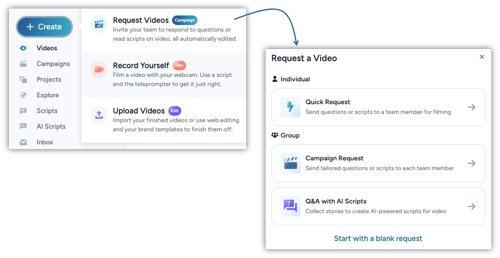
Choose the Right Request Type Below:
⚡ Quick Request
Send a simple video request to an individual using either a list of questions or a prepared script. It's the fastest way to collect a single employee story or message.
Best for: One-off employee stories, testimonials, leadership messages or customer case studies.
Related Article: How to Request Videos Using Quick Request
🎬 Campaign Request
Create a structured campaign and send tailored questions or scripts to multiple people at once. Each recipient can receive personalised prompts while responses are automatically organised within the campaign.
Best for: Employer branding campaigns, graduate recruitment, internal communications, culture initiatives and large-scale content collection.
Related Article: How to Request Videos using Campaign Request
💬 Q&A with AI Scripts
Collect written responses to a series of questions before filming. VideoMy's AI analyses the responses and automatically generates a polished video script for each participant, making filming quicker and easier.
Best for: Employee stories, career journeys, role spotlights and creating consistent, high-quality video content with minimal effort.
Related Article: How to Create a Q&A with Scripts Campaign
🛠️ Start with a Blank Request
Build a completely custom video request Campaign from scratch. Add your own questions or scripts, choose your recipients and configure the request to suit your exact requirements.
Best for: Custom campaigns, unique content requests and workflows that don't fit the standard templates.